
After the meeting, give KIKU the recording,
and let it prepare the minutes.
Give KIKU your recording after a meeting. It automatically creates a speaker-labeled transcript, then organizes it into meeting minutes with conclusions and action items. No one needs to type notes while attending the meeting.

What KIKU can do
Recording
The desktop app records system audio and the microphone at the same time, capturing both sides of an online meeting. You can also import existing recordings.
Quick markers during meetings
During a meeting, tap “Opportunity”, “Requirement”, “Issue”, or “Action item”. Each marker links to the surrounding conversation in the transcript. You decide what matters; AI organizes it.
Speaker-labeled transcripts
Automatically distinguish speakers and show who said what and when in the transcript.
Structured meeting minutes
Get a summary, decisions, action items, and owners, rather than one long block of text.
Long meetings and split recordings
If the first and second halves of a meeting span several files, combine them into one transcript and one set of minutes.
Export and archive
The desktop app exports to Word. The web version saves back to Google Drive or a Google Doc, fitting into your existing document workflow.
Meeting library
List, categorize, and search meetings locally. Deleted meetings go to the trash first.
Work the way you prefer
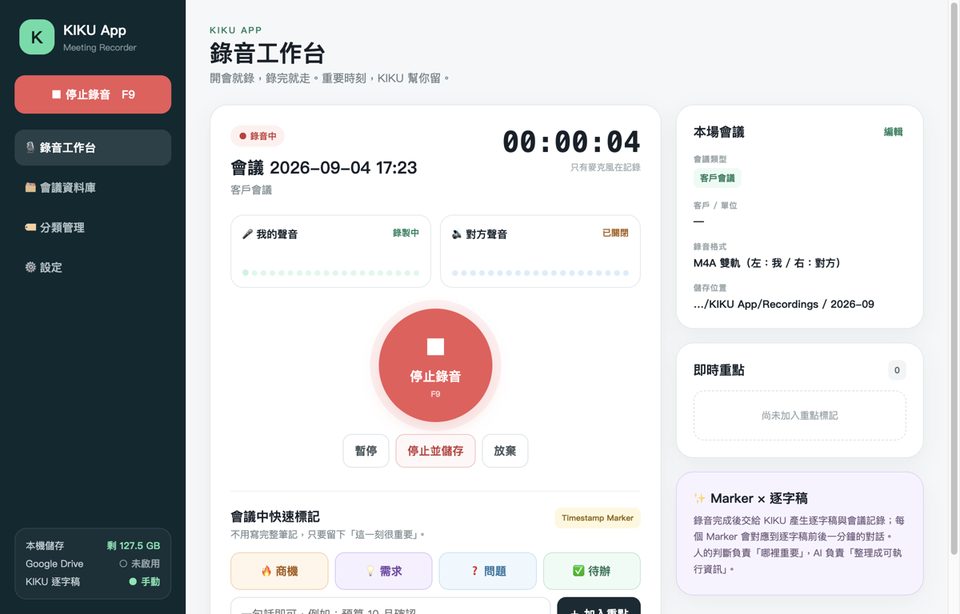
- Desktop: Windows and macOS installers with an illustrated installation guide.
- iOS: Record in person on iPhone or iPad, or import Voice Memos. Results are saved in the Files app.
- Web: Submit a link to a recording on your cloud drive to get started. No installation required.
- Enterprise deployment: Deploy in your company's own Google Cloud account. Recordings and minutes stay in your cloud, with costs and permissions under your control.
Implementation example
E-commerce brand: automated minutes for recurring meetings
A brand team uses the KIKU web version to process recurring meeting recordings. Meetings longer than an hour are uploaded in segments, automatically combined into one set of minutes, and saved back to the company cloud drive.
Want to try it with your own meeting?
Send us a recording. We will process it for you so you can see what the minutes look like.
Email us to book a trial